Helpfull Tips Firestick
USE VPN in Apps
How to use VPN on XCIPTV 403
Open XCIPTV 403 App
Select VPN top Right
Select Connect
VPS is Connected will appear Top Right
Go back and watch channels as normal
NOTE: DO NOT slide auto connect to ON as this can stop the app opening
Done
How to use VPN on Purple TV
Open Purple App
Select VPN (under Live TV)
Tick Automatic
Tick Auto Connect (if required)
Select Connect
connected SUCCESS will appear
Go back and watch TV as normal
BEST PRACTICE
Switch off the Device at the power every night
Then do the weekly maintenance once a week
BEST Apps for Devices
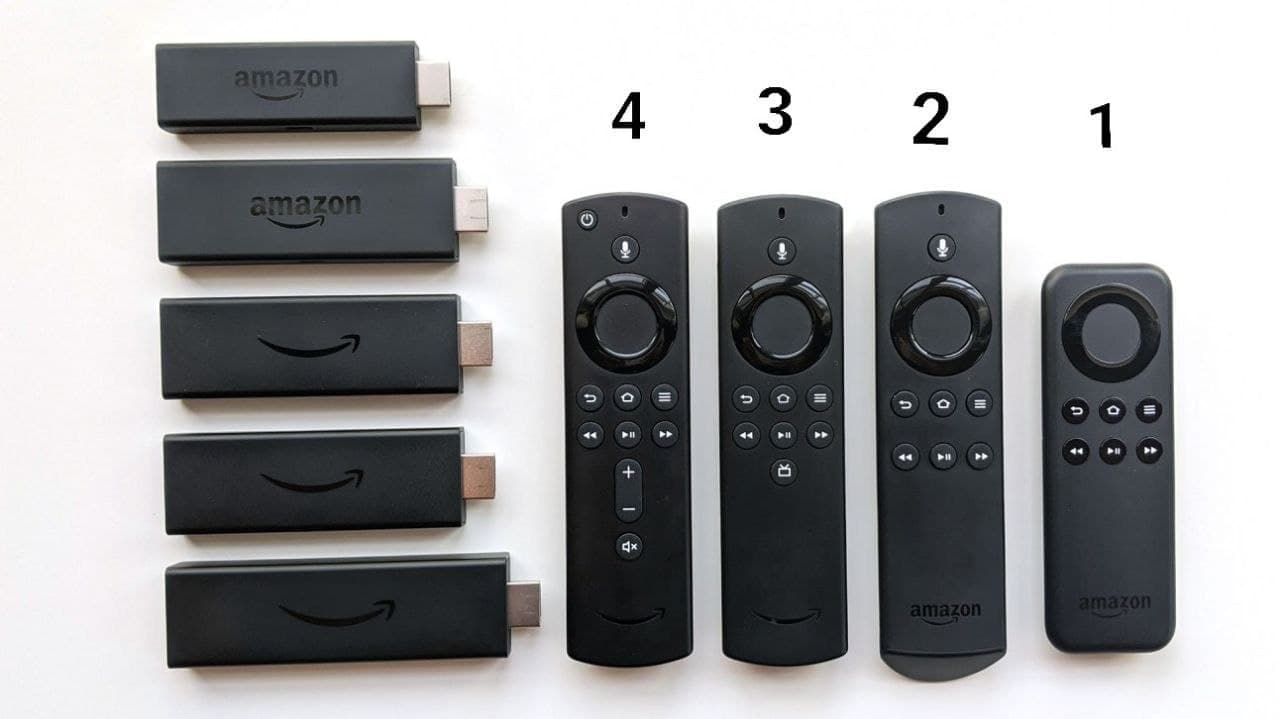 Check your Amazon Remote based on Picture
1. Smarters 221 & NO VPN
Very Old Device, I would Upgrade to Newer
2. XCIPTV 403 OR Smarters 221 & VPN OK
Older Device so Consider upgrading in the next Year
3. (LITE) Purple TV, Smarters 305, XCIPTV 403 OR Smarters 221 & VPN OK
Should get 2 years from this device
4. (4K, MAX) Purple TV, Smarters 305, XCIPTV 403 OR Smarters 221 & VPN OK
Best Device